
A list item has two parts: marker and
content.
The content part is rendered inside the list item's
border box,
and is styled the same way as a normal block,
such as div or p element.
The marker positioning is determined by the
list-style-position
property and is styled using the ::marker
pseudo-element.
List markers are rendered outside the list item in the left
margin area by default.
If the CSS property list-style-position has value
inside,
the marker is rendered as the first inline box inside the list item.
CSS
ol {
    padding-left: 1cm;
    border: solid 2px darkgreen
}
li { border: solid 1px black }
li.inside { list-style-position: inside }
li.outside { list-style-position: outside }
Output
list-style-position to inside,
so the list marker is rendered inside the principal box of li.
list-style-position to outside,
so the list marker is rendered outside the principal box of li.
When the marker position is outside,
it is rendered outside the li principal box.
If you want the marker to appear inside the principal box of
ol,
make sure to give ol enough left padding
or li enough left margin.
Different list marker types can be chosen by setting the
CSS property list-style-type to different values:
disc | hyphen | decimal | lower-alpha | ...
The property list-style-type
applies to list items and determines the type of marker that
they receive. The following table shows examples of the various
list style types (also supported are octal, binary,
lower-hexadecimal and upper-hexadecimal).
decimal |
1, 2, 3, ... |
decimal-leading-zero |
01, 02, 03, ... 09, 10, 11, ... |
lower-alpha, lower-latin
|
a, b, c, ... z, aa, ab, ... |
upper-alpha, upper-latin
|
A, B, C, ... Z, AA, AB, ... |
lower-roman |
i, ii, iii, iv, v, vi, ... |
upper-roman |
I, II, III, IV, V, VI, ... |
asterisks |
*, **, ***, ... |
See also Counter styles.
CSS
li.upper-alpha { list-style-type: upper-alpha }
li.lower-roman { list-style-type: lower-roman }
Output
The list marker can also be replaced by an image by using the
list-style-image property.
The shorthand property list-style can be used to
set the three properties list-style-image,
list-style-position and
list-style-type together.
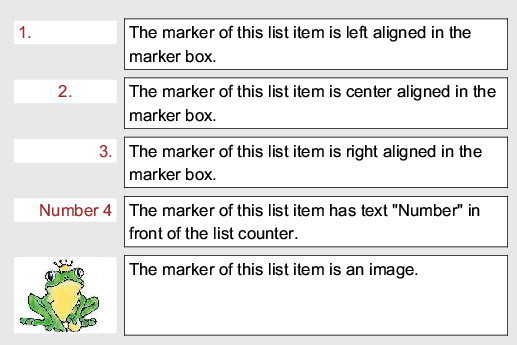
Alternatively, the ::marker pseudo-element can be used to style the
list item marker, giving full control over its content, width, alignment and so on.
CSS
li::marker { width: 2.4cm }
li.left::marker { text-align: left }
li.center::marker { text-align: center }
li.right::marker { text-align: right }
li.text_marker::marker {
    content: "Number " counter(list-item)
}
li.image_marker::marker {
    content: url("../../image/prince.jpg")
}
Output